Right i'm going to put this down in ink, or even better electronic, as its happened twice and I forgot what I did to fix it the first time...
Essentially the issue is a black screen (sometimes with coloured lines/dots) when booting Windows 7.
This happens before the login screen and hangs there indefintley.
This occurs after installing Windows 7 as a virtual machine on VMware ESX/ESXi and then installing VMware Tools.
Once the Windows 7 VM is rebooted the black screen is then all you get.
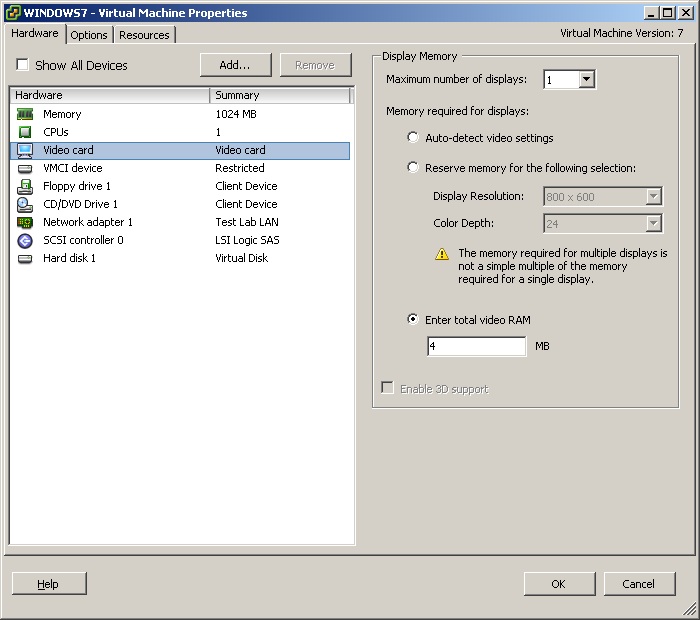
The cause seems to be as soon VMware Tools is installed, and hence replaces the display driver more video ram is required.
By default the Windows 7 VM was created with a video memory size of 4MB. This appears to be insufficient and causes the black screen.
The fix is to increase the video memory size or change it to "Auto-detect video settings". From then on the Windows 7 VM boots and reaches the login screen correctly as expected.
Share this blog post on social media:
Tweet


Latest Blog Posts
- vSphere 7 U1 - Part 3 - Creating a Datacenter, HA/DRS Cluster and Adding a Host
- vSphere 7 U1 - Part 2 - Deploying vCenter 7.0 U1 VCSA
- vSphere 7 U1 - Part 1 - Installing ESXi 7.0 U1
- Veeam CBT Data is Invalid - Reset CBT Without Powering Off VM
- View Administrator Blank Error Dialog/Window After Upgrade