To enable active directory authentication on ESX servers you need to do the following...
1. Ensure that it is currently disabled and config is clear before starting:
/usr/sbin/esxcfg-auth --disablead
2. Confirm the AD kerberos firewall port is blocked:
/usr/sbin/esxcfg-firewall -q activeDirectorKerberos
Service activeDirectorKerberos is blocked.
3. Enable Active Directory Authentication:
/usr/sbin/esxcfg-auth --enablead --addomain=vmadmin.co.uk --addc=dc1.vmadmin.co.uk
4. Confirm the AD kerberos firewall port is open:
/usr/sbin/esxcfg-firewall -q activeDirectorKerberos
Service activeDirectorKerberos is enabled.
5. Add an AD username:
/usr/sbin/useradd myaduser1
6. Now try logging into the ESX server on the console and via SSH.
It should allow you to use your active directory password for each AD user you added.
Checking the users on the ESX server:
getent passwd
root:x:0:0:root:/root:/bin/bash
bin:x:1:1:bin:/bin:/sbin/nologin
daemon:x:2:2:daemon:/sbin:/sbin/nologin
adm:x:3:4:adm:/var/adm:/sbin/nologin
lp:x:4:7:lp:/var/spool/lpd:/sbin/nologin
sync:x:5:0:sync:/sbin:/bin/sync
shutdown:x:6:0:shutdown:/sbin:/sbin/shutdown
halt:x:7:0:halt:/sbin:/sbin/halt
mail:x:8:12:mail:/var/spool/mail:/sbin/nologin
news:x:9:13:news:/etc/news:
uucp:x:10:14:uucp:/var/spool/uucp:/sbin/nologin
operator:x:11:0:operator:/root:/sbin/nologin
gopher:x:13:30:gopher:/var/gopher:/sbin/nologin
ftp:x:14:50:FTP User:/var/ftp:/sbin/nologin
nobody:x:99:99:Nobody:/:/sbin/nologin
nscd:x:28:28:NSCD Daemon:/:/sbin/nologin
vcsa:x:69:69:virtual console memory owner:/dev:/sbin/nologin
rpc:x:32:32:Portmapper RPC user:/:/sbin/nologin
sshd:x:74:74:Privilege-separated SSH:/var/empty/sshd:/sbin/nologin
rpcuser:x:29:29:RPC Service User:/var/lib/nfs:/sbin/nologin
nfsnobody:x:4294967294:4294967294:Anonymous NFS User:/var/lib/nfs:/sbin/nologin
pcap:x:77:77::/var/arpwatch:/sbin/nologin
vimuser:x:12:20:vimuser:/sbin:/sbin/nologin
ntp:x:38:38::/etc/ntp:/sbin/nologin
rpm:x:37:37::/var/lib/rpm:/sbin/nologin
vpxuser:x:500:100:VMware VirtualCenter administration account:/home/vpxuser:/bin/false
myaduser1:x:501:501::/home/myaduser1:/bin/bash
bin:x:1:1:bin:/bin:/sbin/nologin
daemon:x:2:2:daemon:/sbin:/sbin/nologin
adm:x:3:4:adm:/var/adm:/sbin/nologin
lp:x:4:7:lp:/var/spool/lpd:/sbin/nologin
sync:x:5:0:sync:/sbin:/bin/sync
shutdown:x:6:0:shutdown:/sbin:/sbin/shutdown
halt:x:7:0:halt:/sbin:/sbin/halt
mail:x:8:12:mail:/var/spool/mail:/sbin/nologin
news:x:9:13:news:/etc/news:
uucp:x:10:14:uucp:/var/spool/uucp:/sbin/nologin
operator:x:11:0:operator:/root:/sbin/nologin
gopher:x:13:30:gopher:/var/gopher:/sbin/nologin
ftp:x:14:50:FTP User:/var/ftp:/sbin/nologin
nobody:x:99:99:Nobody:/:/sbin/nologin
nscd:x:28:28:NSCD Daemon:/:/sbin/nologin
vcsa:x:69:69:virtual console memory owner:/dev:/sbin/nologin
rpc:x:32:32:Portmapper RPC user:/:/sbin/nologin
sshd:x:74:74:Privilege-separated SSH:/var/empty/sshd:/sbin/nologin
rpcuser:x:29:29:RPC Service User:/var/lib/nfs:/sbin/nologin
nfsnobody:x:4294967294:4294967294:Anonymous NFS User:/var/lib/nfs:/sbin/nologin
pcap:x:77:77::/var/arpwatch:/sbin/nologin
vimuser:x:12:20:vimuser:/sbin:/sbin/nologin
ntp:x:38:38::/etc/ntp:/sbin/nologin
rpm:x:37:37::/var/lib/rpm:/sbin/nologin
vpxuser:x:500:100:VMware VirtualCenter administration account:/home/vpxuser:/bin/false
myaduser1:x:501:501::/home/myaduser1:/bin/bash
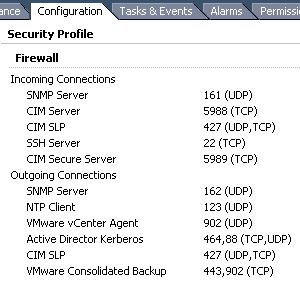
Additionally in vSphere client, when the ESX host is selected and the configuration tab is selected. Under the Security Profile the "Active Director Kerberos" ports will show under outgoing connections.
Share this blog post on social media:
Tweet


Latest Blog Posts
- vSphere 7 U1 - Part 3 - Creating a Datacenter, HA/DRS Cluster and Adding a Host
- vSphere 7 U1 - Part 2 - Deploying vCenter 7.0 U1 VCSA
- vSphere 7 U1 - Part 1 - Installing ESXi 7.0 U1
- Veeam CBT Data is Invalid - Reset CBT Without Powering Off VM
- View Administrator Blank Error Dialog/Window After Upgrade