For guest OS cutomization to work when deploying from a template, the vCenter server needs to have the sysprep files for that operating system to be able to customize its settings.
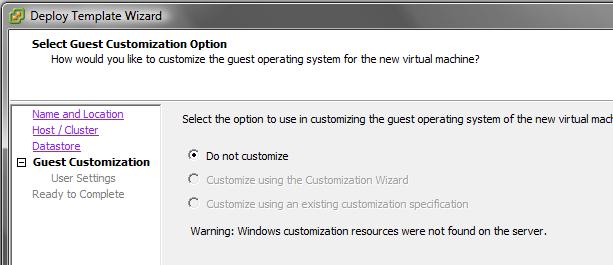
If you do not you will get the following error when deploying from a template:
Warning: Windows customization resources were not found on the server
Use the download links below to get the sysprep files from Microsoft and extract the contents to the correct folder within
C:\Documents and Settings\All Users\Application Data\VMware\VMware VirtualCenter\sysprep
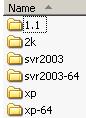
C:\Documents and Settings\All Users\Application Data\VMware\VMware VirtualCenter\sysprep\1.1
Copy contents of the "tools" folder to the "1.1".
C:\Documents and Settings\All Users\Application Data\VMware\VMware VirtualCenter\sysprep\2k
Copy contents of i386\deploy.cab to "2k".
C:\Documents and Settings\All Users\Application Data\VMware\VMware VirtualCenter\sysprep\svr2003
Copy contents of system32\deploy.cab to "svr2003".
C:\Documents and Settings\All Users\Application Data\VMware\VMware VirtualCenter\sysprep\svr2003-64
Copy contents of SP2QFE\deploy.cab to "svr2003-64".
C:\Documents and Settings\All Users\Application Data\VMware\VMware VirtualCenter\sysprep\xp
Copy contents of CAB file to "xp".
C:\Documents and Settings\All Users\Application Data\VMware\VMware VirtualCenter\sysprep\xp-64
Copy contents of SP2QFE\deploy.cab to "xp-64".
Note: Windows Server 2008, Windows Server 2008 R2, Windows Vista and Windows 7 use a new method for imaging which does not require sysprep files on the vCenter server.