Ive started using PowerCLI a bit more in day-to-day situations, and i'm finding it rather useful. Once youve got your head round the syntax and the available cmd-lets its a viable time saving option, especially as you grow your little repo of reusable scripts. Here is one of mine that I made today...
I had the need to enable "Remote Tech Support Mode" (TSM-SSH) on all ESXi 4.1 servers for various reasons then disable it again.
Not favouring the manual process of going into each host in vCenter --> Host --> Configuration --> Security profile etc etc I wanted to be able to run a script that would do this for me. And confirm afterwards I had turned it all back off.
That resulted in the following 3 PowerCLI scripts for viewing, starting and stopping the TSM-SSH service on all ESXi servers.
Note: Before running remember to run "Connect-VIServer vcenter.domain.local"
ViewServiceSSH.ps1
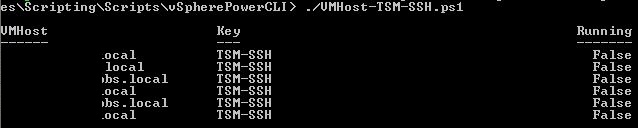
Example Output:
StartServiceSSH.ps1
StopServiceSSH.ps1
I had the need to enable "Remote Tech Support Mode" (TSM-SSH) on all ESXi 4.1 servers for various reasons then disable it again.
Not favouring the manual process of going into each host in vCenter --> Host --> Configuration --> Security profile etc etc I wanted to be able to run a script that would do this for me. And confirm afterwards I had turned it all back off.
That resulted in the following 3 PowerCLI scripts for viewing, starting and stopping the TSM-SSH service on all ESXi servers.
Note: Before running remember to run "Connect-VIServer vcenter.domain.local"
ViewServiceSSH.ps1
function ViewServiceSSH {
$VMHost = Get-VMHost
foreach ($VMHost in $VMHost) {
Get-VMHostService -VMHost $VMHost | where {$_.Key -eq "TSM-SSH"} | Select @{N="VMHost";E={$VMHost.Name}},Key,Running
}
}
ViewServiceSSH
$VMHost = Get-VMHost
foreach ($VMHost in $VMHost) {
Get-VMHostService -VMHost $VMHost | where {$_.Key -eq "TSM-SSH"} | Select @{N="VMHost";E={$VMHost.Name}},Key,Running
}
}
ViewServiceSSH
Example Output:
StartServiceSSH.ps1
function StartServiceSSH {
$VMHost = Get-VMHost
foreach ($VMHost in $VMHost) {
Get-VMHostService -VMHost $VMHost | where {$_.Key -eq "TSM-SSH"} | Start-VMHostService
}
}
StartServiceSSH
$VMHost = Get-VMHost
foreach ($VMHost in $VMHost) {
Get-VMHostService -VMHost $VMHost | where {$_.Key -eq "TSM-SSH"} | Start-VMHostService
}
}
StartServiceSSH
StopServiceSSH.ps1
function StopServiceSSH {
$VMHost = Get-VMHost
foreach ($VMHost in $VMHost) {
Get-VMHostService -VMHost $VMHost | where {$_.Key -eq "TSM-SSH"} | Stop-VMHostService
}
}
StopServiceSSH
$VMHost = Get-VMHost
foreach ($VMHost in $VMHost) {
Get-VMHostService -VMHost $VMHost | where {$_.Key -eq "TSM-SSH"} | Stop-VMHostService
}
}
StopServiceSSH
Share this blog post on social media:
Tweet


Latest Blog Posts
- vSphere 7 U1 - Part 3 - Creating a Datacenter, HA/DRS Cluster and Adding a Host
- vSphere 7 U1 - Part 2 - Deploying vCenter 7.0 U1 VCSA
- vSphere 7 U1 - Part 1 - Installing ESXi 7.0 U1
- Veeam CBT Data is Invalid - Reset CBT Without Powering Off VM
- View Administrator Blank Error Dialog/Window After Upgrade