There is an issue with a Guest OS of either Windows Server 2008 R2 or Windows 7 running on VMware ESX/ESXi 4.x with VMware Tools installed. The display driver SVGA-II freezes intermittently and sometimes permanently requiring reset of the VM.
This is a display driver issue which is resolved in the latest VMware Tools in ESX/ESXi 4.0 Update 1.
However manual intervention is also required after updating to the latest VMware Tools to replace the display driver.
Check the current version of VMware Tools and display driver being used.
VMware Tools 4.0.0 Build 208167 or before uses the "VMware SVGA-II" display driver which causes the problem.
1. Uninstall VMware Tools
2. Restart the server.
3. Install latest VMware Tools 4.0.0 Build 219382 or later
This will use the "Standard VGA Graphics Driver" but the video will appear slow and choppy.
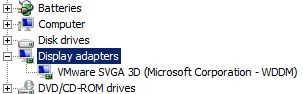
To resolve this the VMware SVGA 3D (WDDM) for Windows Server 2008 R2 and Windows 7 needs adding.
4. Manually update the display driver via Device Manager to the following driver:
C:\Program Files\Common Files\VMware\Drivers\wddm_video
"VMware SVGA 3D (Microsoft Corporation - WDDM)" The driver folder is created when the latest version of VMware Tools was installed.
5. Restart the server.
Share this blog post on social media:
Tweet


Latest Blog Posts
- vSphere 7 U1 - Part 3 - Creating a Datacenter, HA/DRS Cluster and Adding a Host
- vSphere 7 U1 - Part 2 - Deploying vCenter 7.0 U1 VCSA
- vSphere 7 U1 - Part 1 - Installing ESXi 7.0 U1
- Veeam CBT Data is Invalid - Reset CBT Without Powering Off VM
- View Administrator Blank Error Dialog/Window After Upgrade