You may or may not have noticed while using vSphere client connected to vCenter there are keyboard shortcuts.
These can be very handy and are worth remembering ones that are useful to you. I will list all that I can find in vCenter here, as far as I know they are not listed anywhere by VMware.
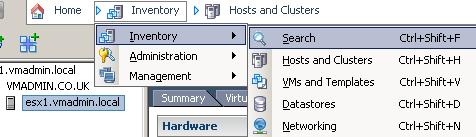
Change Inventory Views
CTRL+SHIFT+F Search
CTRL+SHIFT+H Hosts and Clusters
CTRL+SHIFT+V VMs and Templates
CTRL+SHIFT+D Datastores
CTRL+SHIFT+N Networking
Navigation
ALT+HOME Go to Home Screen
ALT+LEFT Go Back Through Navigation History
ALT+RIGHT Go Forward Through Navigation History
CTRL+TAB Change Tab Forwards
CTRL+SHIFT+TAB Change Tab Backwards
Making New Things (Depends if your on the Datacenter, Cluster etc)
CTRL+F New Folder
CTRL+D New Datacenter
CTRL+O New Resource Pool
CTRL+H New Host
CTRL+L New Cluster
CTRL+A New vApp
CTRL+N New Virtual Machine
Operate Virtual Machines (A VM needs to be selected)
CTRL+B Power On
CTRL+E Power Off
CTRL+Z Suspend
CTRL+T Reset
CTRL+D Shutdown Guest
CTRL+R Restart Guest
CTRL+ALT+ENTER Enter Full Screen
Manage Objects (These options apply to all objects)
CTRL+P Define Permissions
CTL+S Create Scheduled Task
CTL+M Add Alarm
Administration
CTRL+SHIFT+R Roles
CTRL+SHIFT+S Sessions
CTRL+SHIFT+L Licensing
CTRL+SHIFT+O System Logs
CTRL+SHIFT+I Server Settings
Management
CTRL+SHIFT+T Scheduled Tasks
CTRL+SHIFT+E Events
CTRL+SHIFT+M Maps
CTRL+SHIFT+P Host Profiles
CTRL+SHIFT+U Customization Specifications Manager
Share this blog post on social media:
Tweet


Latest Blog Posts
- vSphere 7 U1 - Part 3 - Creating a Datacenter, HA/DRS Cluster and Adding a Host
- vSphere 7 U1 - Part 2 - Deploying vCenter 7.0 U1 VCSA
- vSphere 7 U1 - Part 1 - Installing ESXi 7.0 U1
- Veeam CBT Data is Invalid - Reset CBT Without Powering Off VM
- View Administrator Blank Error Dialog/Window After Upgrade