After rebooting the server running vCenter, you find you cannot log into vCenter with vSphere client. On further inspection you find the "VMware VirtualCenter Server" service is not running (even though it is set to automatic). However you can start it manually, it just will not start automatically after a reboot.
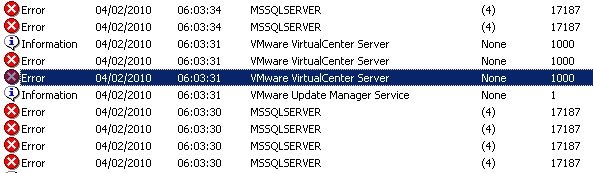
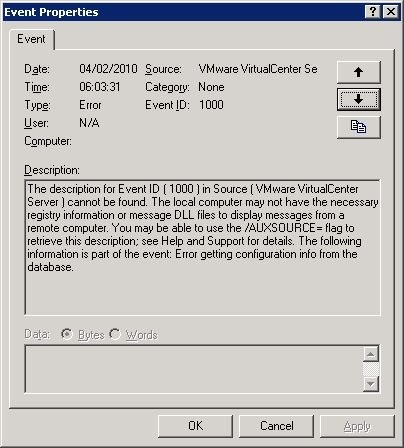
Event ID 1000 explains in the description, it could not get the configuration from the database:
Event Type: Error
Event Source: VMware VirtualCenter Server
Event ID: 1000
Description:
The description for Event ID ( 1000 ) in Source ( VMware VirtualCenter Server ) cannot be found. The local computer may not have the necessary registry information or message DLL files to display messages from a remote computer. You may be able to use the /AUXSOURCE= flag to retrieve this description; see Help and Support for details. The following information is part of the event: Error getting configuration info from the database.
Additionally you may see the following events:
Event Type: Error
Event Source: MSSQLSERVER
Event ID: 17187
Description:
SQL Server is not ready to accept new client connections. Wait a few minutes before trying again. If you have access to the error log, look for the informational message that indicates that SQL Server is ready before trying to connect again. [CLIENT: <local machine>]
Event Type: Error
Event Source: Service Control Manager
Event ID: 7024
Description:
The VMware VirtualCenter Server service terminated with service-specific error 2 (0x2).
Event Type: Error
Event Source: Service Control Manager
Event ID: 7001
Description:
The VMware VirtualCenter Management Webservices service depends on the VMware VirtualCenter Server service which failed to start because of the following error:
The service has returned a service-specific error code.
This occurs if you are running the vCenter database (SQL Server) on the same server as vCenter itself.
As the server starts up it starts SQL Server, but this may take sometime. While this is taking place vCenter services try and start, in doing so attempts connecting to the SQL Server database (which is not ready) hence the event ID 17187. Finally it fails to start the service.
This is what is known as a race condition. vCenter is trying to start before SQL Server which it depends on. If you have your SQL Server on another server this will not be a problem.
Checking the service properties tab will confirm the dependancy does not exist for SQL Server.
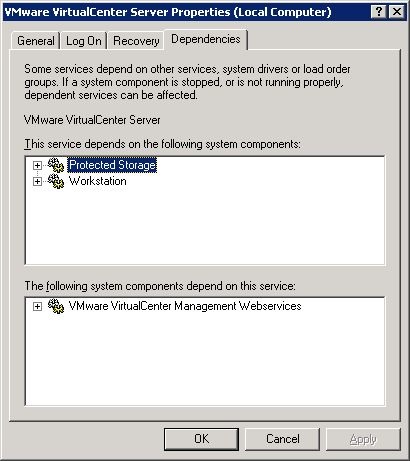
It resolve this we need to create dependancies for the"VMware VirtualCenter Server" service for the following services:
MSSQLSERVER
ADAM_VMwareVCMSDS (If using vCenter Server 4)
By doing so will ensure the "VMware VirtualCenter Server" service starts after its required services have started.
Create a Service Dependancy:
Click Start--> Run.
Type "services.msc", Click Ok.
Find the services (service names) required for vCenter to start (MSSQLSERVER and ADAM_VMwareVCMSDS).
Click Start--> Run.
Type "regedit", Click Ok.
Browse to HKEY_LOCAL_MACHINE\SYSTEM\CurrentControlSet\Services\vpxd.
Edit the "DependOnService" key and add the service names required.
Close Regedit.
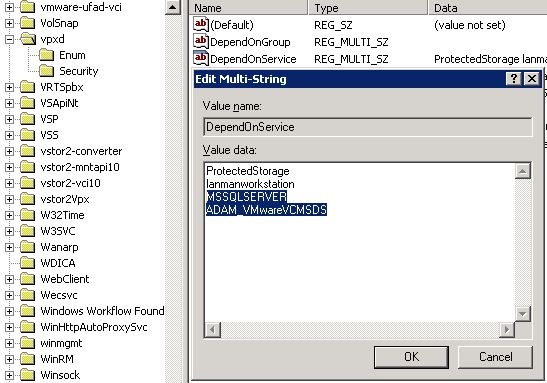
Checking the service properties tab will confirm the dependancy is now configured.
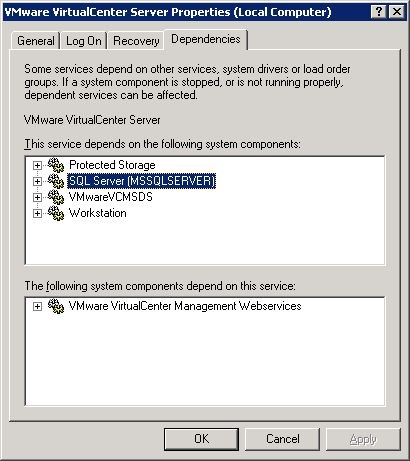
From now on when you reboot the server, the VMware VirtualCenter Server service will wait until is dependancies have started before it tries to start.
Share this blog post on social media:
Tweet


Latest Blog Posts
- vSphere 7 U1 - Part 3 - Creating a Datacenter, HA/DRS Cluster and Adding a Host
- vSphere 7 U1 - Part 2 - Deploying vCenter 7.0 U1 VCSA
- vSphere 7 U1 - Part 1 - Installing ESXi 7.0 U1
- Veeam CBT Data is Invalid - Reset CBT Without Powering Off VM
- View Administrator Blank Error Dialog/Window After Upgrade