This is an introduction to VMware View 4.5 and how its components are installed and configured alongside vSphere to provide virtual desktops.
New features in VMware View 4.5:
-
VMware View 4.5 has a completely new Adobe Flex-based user interface and includes a number of new features and types of objects.
-
It supports role-based administration and has various degrees of administrative privileges for user accounts.
-
Supports the use of Microsoft System Center Operation Manager for managing servers from a central location.
-
Supports Sysprep for customizing and provisioning desktops.
-
Includes Refresh, Recompose, and Rebalance features for non-persistent pools.
-
Allows you to place the replicas on a separate datastore for linked clone pools.
-
Supports the View Client with Local Mode feature. In earlier releases, this is an experimental feature called View Offline Desktop. To use this feature, you must install View Client for offline desktops and Transfer server. The Transfer server is used to support desktops that run View Client with local mode.
-
Supports the Kiosk Mode. A client in Kiosk Mode is a thin client or a lock-down PC that runs View Client to connect to a View Connection Server instance and launches a remote desktop session. End users do not have to log in to access the client device.
-
Supports Windows 7 virtual machines.
-
Supports Mac OS 10.5 + as a Client. You must use the RDP protocol when connecting using Mac. PCoIP is not supported.
-
Includes the ThinApp option to publish thinapp created applications on virtual machines by using View admin UI.
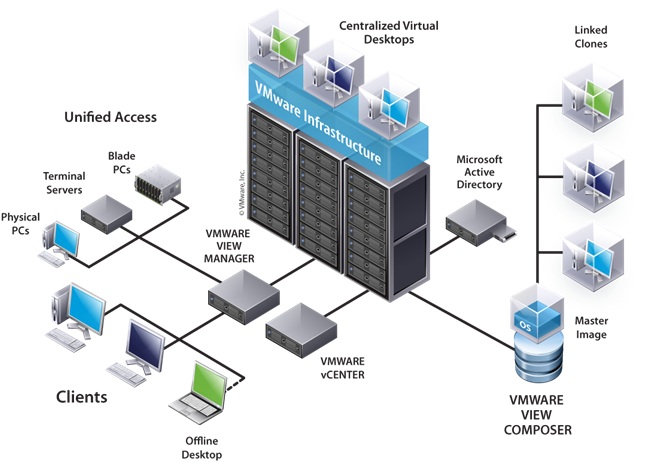
Overview Diagram of VMware View:
Pre-requisites:
You will need an existing vSphere installation. This will comprise of one or more ESX/ESXi server(s) and a vCenter server:
You will need an existing vSphere installation. This will comprise of one or more ESX/ESXi server(s) and a vCenter server:
-
ESX/ESXi 4.1 (see Installing ESXi 4.1 U1)
-
vCenter Server 4.1 (see Installing vCenter Server 4.1)
Note: In large deployments of VMware View mutiple ESXi clusters and vCenter servers are required to support 1000's of virtual desktops.
Documentation
I recommend reading the following...
VMware View 4.5 Architecture Planning Guide
VMware View 4.5 Administrator Guide
VMware View 4.5 Installation Guide
VMware View 4.5 Architecture Planning Guide
VMware View 4.5 Administrator Guide
VMware View 4.5 Installation Guide
Download
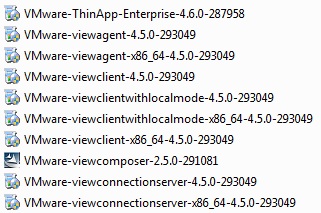
Components of VMware View Enterprise:
-
View Connection Server (Install on a dedicated server)
-
View Agent (Install on virtual desktop VM)
-
View Client (Install on all client PCs - either physical desktops or on thin clients)
Components of VMware View Premier:
-
View Composer (Install on vCenter server)
-
View Agent (Install on virtual desktop VM)
-
View Client (Install on all client PCs - either physical desktops or on thin clients)
-
View Client with Local Mode (Install on client physical laptop)
-
ThinApp Enterprise
VMware View 4.5 How To Series:
View 4.5 Part 1 - Intro and Components
View 4.5 Part 2 - Installing View Composer
View 4.5 Part 3 - Installing View Connection Server
View 4.5 Part 4 - Configuring with View Adminstrator
View 4.5 Part 5 - Creating a Master/Golden Image
View 4.5 Part 6 -
Share this blog post on social media:
Tweet


Latest Blog Posts
- vSphere 7 U1 - Part 3 - Creating a Datacenter, HA/DRS Cluster and Adding a Host
- vSphere 7 U1 - Part 2 - Deploying vCenter 7.0 U1 VCSA
- vSphere 7 U1 - Part 1 - Installing ESXi 7.0 U1
- Veeam CBT Data is Invalid - Reset CBT Without Powering Off VM
- View Administrator Blank Error Dialog/Window After Upgrade