When using VMware vSphere as the hypervisor for Citrix XenDesktop, there may be an issue you encounter when trying to initially connect to the vCenter server during initial config of XenDesktop.
With XenDesktop 5.5, you will most come across this very useful error message:
"Object reference not set to an instance of an object"
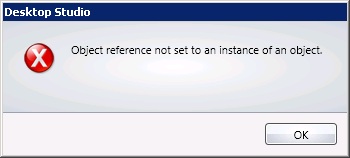
This error message is essentially due to communications with VMware vCenter Server being secured and encrypted with an SSL certificate.
The SSL certificate in question is a self-signed and generated certifcate by vCenter at the time of installation, unless you changed this to a public signed one by verisign? (No i didn't think so).
So all you have to do is get the desktop delivery controller(s) (DDCs) to trust this certificate - easy!
We still want to continue to use secure https communication with the vCenter server.
1. Open Internet Explorer and browse to the https address of your vCenter server.
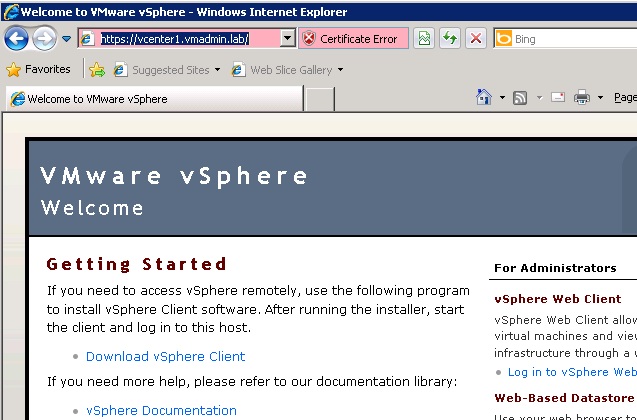
2. Click on the certificate error and view the certificate
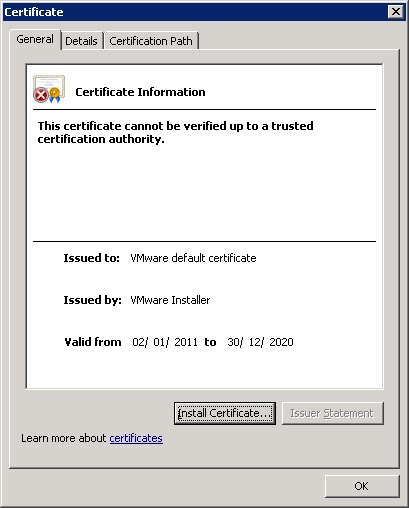
3. When the certifcate opens click "Install certificate"
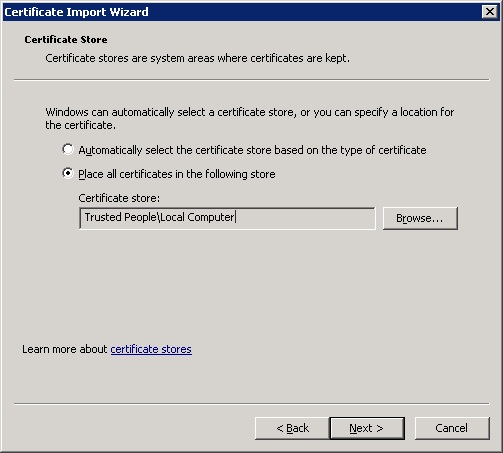
4. Install the certificate to "Trusted People/Local Computer".
Note: You need tick physical locations and choose local computer otherwise it will not work.
Share this blog post on social media:
Tweet


Latest Blog Posts
- vSphere 7 U1 - Part 3 - Creating a Datacenter, HA/DRS Cluster and Adding a Host
- vSphere 7 U1 - Part 2 - Deploying vCenter 7.0 U1 VCSA
- vSphere 7 U1 - Part 1 - Installing ESXi 7.0 U1
- Veeam CBT Data is Invalid - Reset CBT Without Powering Off VM
- View Administrator Blank Error Dialog/Window After Upgrade