To take advantage of the benefits of .admx files, you must create a Central Store in the SYSVOL folder. The Central Store is a location that is checked by GPMC. The GPMC will use .admx files that are in the Central Store. The files that are in the Central Store are replicated to all domain controllers in the domain.
First on a domain controller (Windows Server 2008/2008 R2) the ADMX policy definitions and language template files in %SYSTEMROOT%\PolicyDefinitions need copying to %SYSTEMROOT%\SYSVOL\domain\Policies\PolicyDefinitions.
Run the following command to copy the entire folder contents to SYSVOL. This will then replicate to all domain controllers (the default ADMX policies and EN-US language templates (ADML) are about 6.5 MB in total).
xcopy /E "%SYSTEMROOT%\PolicyDefinitions" "%SYSTEMROOT%\SYSVOL\domain\Policies\PolicyDefinitions\"
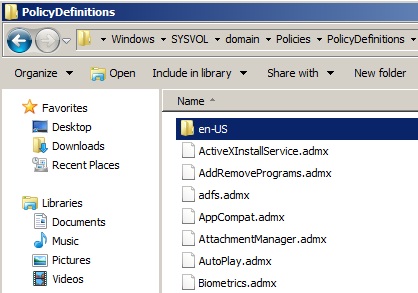
Next ensure you have remote server administration tools (RSAT) installed on your client computer you are using to edit the GPO's. This will need to be Windows Vista or Windows 7.
For Windows Vista enable the RSAT feature (GPMC).
For Windows 7 download and install RSAT then enable the RSAT feature (GPMC).
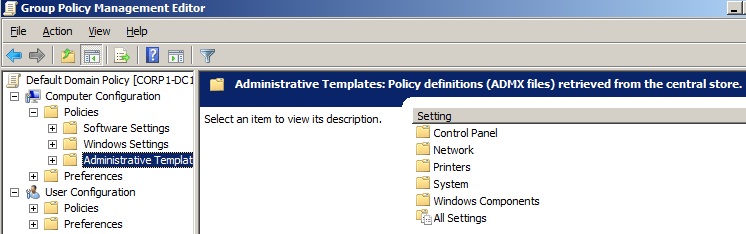
When editing a GPO in the GMPC you will find that the Administrative Templates show as "Policy Definitions (ADMX files) retrieved from the central store".
This confirms it is working as expected.
Further details here http://support.microsoft.com/kb/929841/en-us
Share this blog post on social media:
Tweet


Latest Blog Posts
- vSphere 7 U1 - Part 3 - Creating a Datacenter, HA/DRS Cluster and Adding a Host
- vSphere 7 U1 - Part 2 - Deploying vCenter 7.0 U1 VCSA
- vSphere 7 U1 - Part 1 - Installing ESXi 7.0 U1
- Veeam CBT Data is Invalid - Reset CBT Without Powering Off VM
- View Administrator Blank Error Dialog/Window After Upgrade