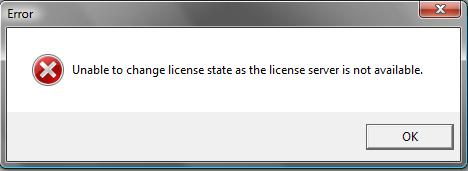
So im setting up my test environment and when trying to configure the ESX server to get its license from the license server I get the following error:
"Unable to change license state as the license server is unavailable"
Along with the following log entries in /var/log/vmware/hostd-X.log
dynamicType = <unset>,
licenseServer = "This email address is being protected from spambots. You need JavaScript enabled to view it.",
msg = ""
}
[2009-02-22 19:37:02.425 'EnvironmentBrowser' 21687216 info] Hw info file: /etc/vmware/hostd/hwInfo.xml
[2009-02-22 19:37:02.430 'EnvironmentBrowser' 21687216 info] Config target info loaded
[2009-02-22 19:37:32.021 'PropertyCollector' 98446256 warning] GetPropertyProvider failed for haTask--vim.LicenseManager.configureSource-147325
[2009-02-22 19:37:32.023 'PropertyCollector' 98446256 warning] GetPropertyProvider failed for haTask--vim.LicenseManager.configureSource-147325
[2009-02-22 19:38:05.421 'PropertyCollector' 21687216 warning] GetPropertyProvider failed for haTask--vim.LicenseManager.configureSource-147325
[2009-02-22 19:38:05.423 'PropertyCollector' 21687216 warning] GetPropertyProvider failed for haTask--vim.LicenseManager.configureSource-147325
I did the usual checks:
- Ping the license server IP address (the vCenter server)
- Checked no firewall is blocking license server ports 27000 and 27010
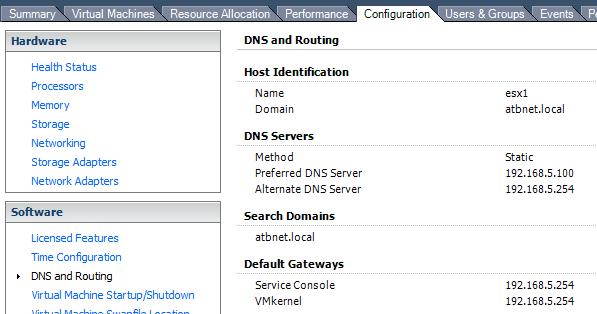
- Then I checked the ESX server can resolve the DNS name of the license server.
I found that it could not resolve the IP of the vCenter server. This was due to the fact I had not setup the correct DNS servers in my ESX server.
Because it could not resolve the DNS name to an IP it was failing its the check and essentially telling me it is not available.
Adding the correct DNS server IP into the ESX server, allowed it to resolve the IP and continue to change the license server configuration settings.
Share this blog post on social media:
Tweet


Latest Blog Posts
- vSphere 7 U1 - Part 3 - Creating a Datacenter, HA/DRS Cluster and Adding a Host
- vSphere 7 U1 - Part 2 - Deploying vCenter 7.0 U1 VCSA
- vSphere 7 U1 - Part 1 - Installing ESXi 7.0 U1
- Veeam CBT Data is Invalid - Reset CBT Without Powering Off VM
- View Administrator Blank Error Dialog/Window After Upgrade